
Improve the translation quality of your international website in 8 steps
Launching an international website is one thing. But how do you ensure that your translations are not only accurate but also align with your brand, the local market, and your visitors’ search behavior?
With Clonable , you can translate and manage international websites from a single central platform. You automatically keep your content up to date and use various features to tailor your translations to the local target audience. This way, you avoid unnecessary manual work and maintain control over the quality of your international websites.
In this step-by-step guide, you’ll discover how to improve the translation quality of your website—from local keyword research and setting up the right “ tone of voice ” to using a glossary, exclusions, and quality control by a native speaker.
Your strategy determines the approach
How much time you invest in translation quality depends on your objectives. Do you want to test a new market with a limited investment? Then start with the basics. As soon as the results improve, you can further optimize your translations for the local market.
The basics: strategy and settings in Clonable
A strong international website starts with an understanding of the local market. What works in the Netherlands may not yield the same results in France. With the right settings in Clonable , you lay the foundation for translations that resonate with your target audience.
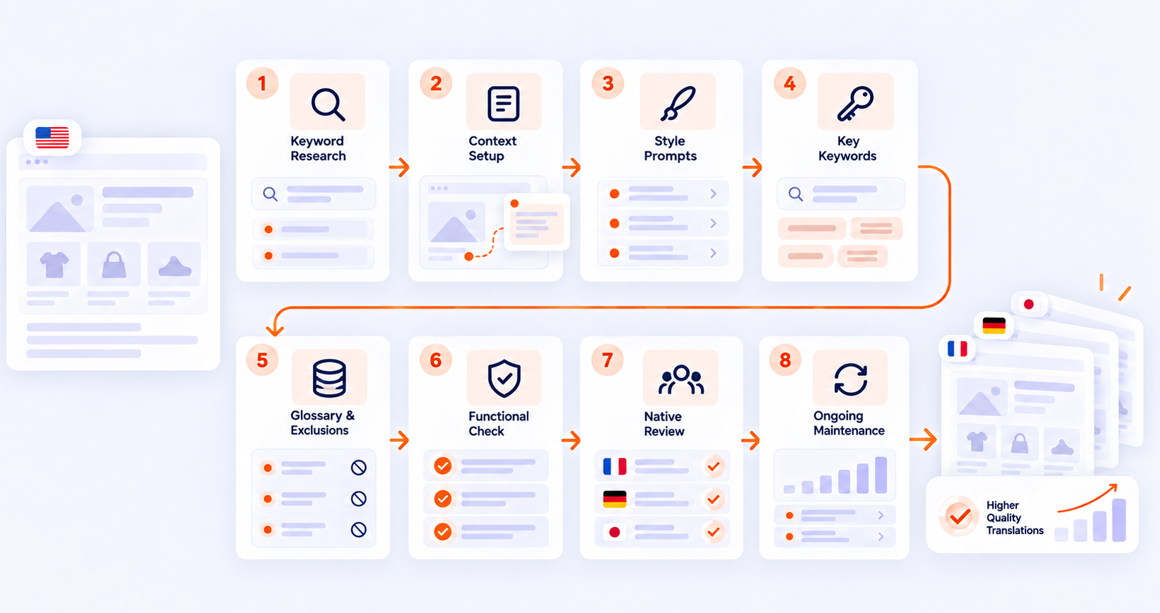
8 Steps to Better Translation Quality
- The basics: strategy and settings in Clonable
- Step 1. Research local keywords and competitors (3–16 hours)
- Step 2. Set the appropriate context and formality (15 minutes)
- Step 3. Customize your “ tone of voice ” with “ Style Prompts ” (15 minutes)
- Step 4. Optimize your translations for local SEO with key keywords (15 minutes)
- Step 5. Use the Glossary and Exclusions to ensure consistent translations (1–8 hours)
- Step 6. Check your website yourself (2–4 hours)
- Step 7. Have your most important pages reviewed by a native speaker (4–8 hours)
- Step 8. Schedule periodic maintenance (2–4 hours)
Step 1. Research local keywords and competitors (3–16 hours)
Literally translating keywords doesn’t always work. Your target audience in other countries often uses different terms to find the same products or services. For example, a German visitor is more likely to search for “Trekkingreise” than for a literal translation of “hiking vacation.”
Therefore, research which keywords your target audience uses and which terms local competitors rank well for. Also look at their tone of voice. In the German B2B market, for example, the choice between the formal “Sie” and the informal “du” can influence how visitors perceive your company.
How thoroughly you approach this depends on your objectives:
Quick check (3–5 hours): Identify your 20 most important keywords and review three local competitors. This will give you a quick understanding of the correct terminology and tone of voice.
In-depth research (8–16 hours): Analyze local search volumes, identify opportunities relative to competitors, and compile a list of relevant technical terms for your products or services.
Tip: Record the most important insights in the context settings and Glossary at Clonable. This way, you’ll automatically use this information when translating your website.
Step 2. Set the appropriate context and formality (15 minutes)
An automatic translation engine works quickly but does not automatically understand the specific context of your organization. That’s why Clonable ’s context settings allow you to provide background information about your company, target audience, and preferred form of address.
For example, do you sell medical equipment to business customers? Then a formal tone is likely a better fit for your target audience. Are you targeting young travelers instead? Then you can opt for a more informal tone.
You can also add information about your industry, such as “We are a B2B wholesaler of building materials.” This helps the translation engine choose the right words and phrasing. With just 15 minutes of work, you provide the translation engine with clear guidelines that will be applied to every translation.
Step 3. Customize your “ tone of voice ” with “ Style Prompts ” (15 minutes)
In addition to the general context settings, you can use Style Prompts to further tailor the writing style of your translations to a specific market. You provide the translation engine with instructions regarding the tone, word choice, and nuances you want to see reflected in a particular language.
For example, do you rent out vacation homes? Then, for the German market, you can place more emphasis on hygiene, cleanliness, and practical information. For the Scandinavian market, on the other hand, you might opt for a warmer, more informal tone.
Style Prompts s also offer a solution when you want to appeal to a different target audience in a new market. For example, you can give the translations a younger or, conversely, a more business-like tone without modifying your original website content. This allows you to preserve the core of your message while tailoring the presentation to your local target audience.
Step 4. Optimize your translations for local SEO with key keywords (15 minutes)
With the new beta feature “key keywords,” you can provide Clonable with strategic keywords that you’d like to see appear more frequently in your translations. The difference from a glossary is that you don’t enforce a fixed translation. Instead, you specify a preference for certain terms, which the translation engine incorporates naturally into the text when the context allows.
Suppose your German keyword research reveals that your target audience is primarily searching for terms related to sustainability or efficiency. In that case, you can add these terms as key keywords. This way, you use the insights from your keyword research to better align your international content with local search behavior.
Step 5. Use the Glossary and Exclusions to ensure consistent translations (1–8 hours)
Using the Glossary and Exclusions features at Clonable , you can determine how the translation engine handles specific words and terms on your website.
Glossary: Define standard translations for terms such as technical jargon, product categories, and key search terms. This ensures consistent terminology across your entire website.
Exclusions: Specify which words should not be translated, such as brand names, product codes, and proper nouns. This helps you maintain your brand identity and prevent unwanted translations.
Compiling these lists manually can be quite time-consuming. That’s why Clonable is developing an automatic generator that scans your website and makes suggestions for relevant Glossary terms and Exclusions.
You review the suggestions, supplement them where necessary, and decide which terms you want to use. Depending on the size of your website and product catalog, this step takes about 1 to 8 hours. Once you’ve set the preferences, Clonable automatically applies them when translating your content. This way, you don’t have to adjust each translation individually.
Optimization: Quality Control and Maintenance
With the right settings, you’ll lay a strong foundation for your international website. Want to further improve translation quality? Then you can perform additional checks and have your most important pages reviewed by a native speaker.
Step 6. Check your website yourself (2–4 hours)
Even if you don’t speak the target language, you can identify many issues on your own. Translated texts are sometimes longer than the original content. This can affect your website’s design, particularly in German and French.
Therefore, view your translated website as if you were a visitor. For example, check:
The main menu and navigation
Buttons and calls to action
Contact forms and search filters
Text display on mobile devices
The complete ordering or request process
Make sure that text remains clearly visible, buttons work properly, and visitors can place an order or contact you without any issues. This check helps prevent minor errors in design or functionality from disrupting the user experience.
Step 7. Have your most important pages reviewed by a native speaker (4–8 hours)
You don’t need to have your entire website manually reviewed right away. By focusing on the pages that are most important to your visitors and conversions, you can achieve a lot with a limited time investment.
We call this the 95% rule: by specifically optimizing your most important pages, you can achieve 95% of the visible improvements in a short amount of time.
For example, have a native speaker review your 20 most important pages:
The homepage
Key category and service pages
The Contact Page
The “About Us” page
The ordering or quotation process
A native speaker not only checks the language but also pays attention to local expressions, word choice, and persuasiveness. This makes the texts sound more natural and builds trust with your target audience.
When should you opt for full proofreading?
Do you want to build a strong position in a market where every nuance counts? Then you can choose to have all website content reviewed by a native speaker.
Examples include product descriptions, blogs, white papers, terms and conditions, and transactional emails. A full review takes more time (16–40+ hours) but offers added assurance when you have high standards for your website’s local appeal.
Step 8. Schedule periodic maintenance (2–4 hours)
Your international website continues to evolve. You add new products, publish blog posts, and update existing pages. Clonable automatically keeps the translated versions in sync with your original website. Still, it’s wise to check regularly whether your settings and translations still align with your content.
For example, schedule a brief maintenance session every quarter. Review new pages, have important texts reviewed by a native speaker where necessary, and update your Glossary and Exclusions with new technical terms or brand names. This way, you can maintain the quality of your international websites without having to manage each language version separately.
What level of translation quality can you expect?
How much time you invest in optimization depends on your goals. Clonable offers various options to improve the quality of your translations.
Without proofreading (97–98%): With the right context settings, glossary, and other translation features, you lay a strong foundation. This is a cost-effective way to test a new market.
With proofreading (up to 99.9%): By having a native speaker review your most important pages as well, you enhance the local appeal and ensure a natural, convincing text.
You decide how much time to invest in further optimization. This way, you can start small and continue to improve translation quality as your international operations grow.
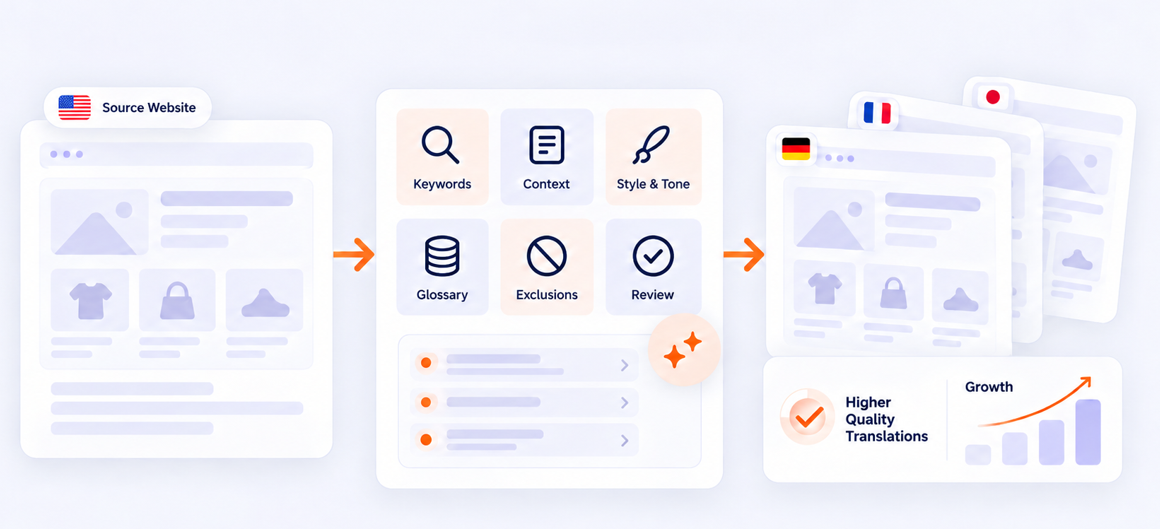
Want to get started with better website translations yourself?
You don’t have to complete all the steps at once. Start with the settings that are important for your website and continue to optimize your translations as your international operations grow.
Would you like to discover for yourself how you can improve the translation quality of your international website with Clonable ?
Get started with Clonable for free today
Discover how to centrally manage international websites from a single platform.